
The Internal AI Agent and the Platform's Native Tools
Not another chat, but a participant in a governed process
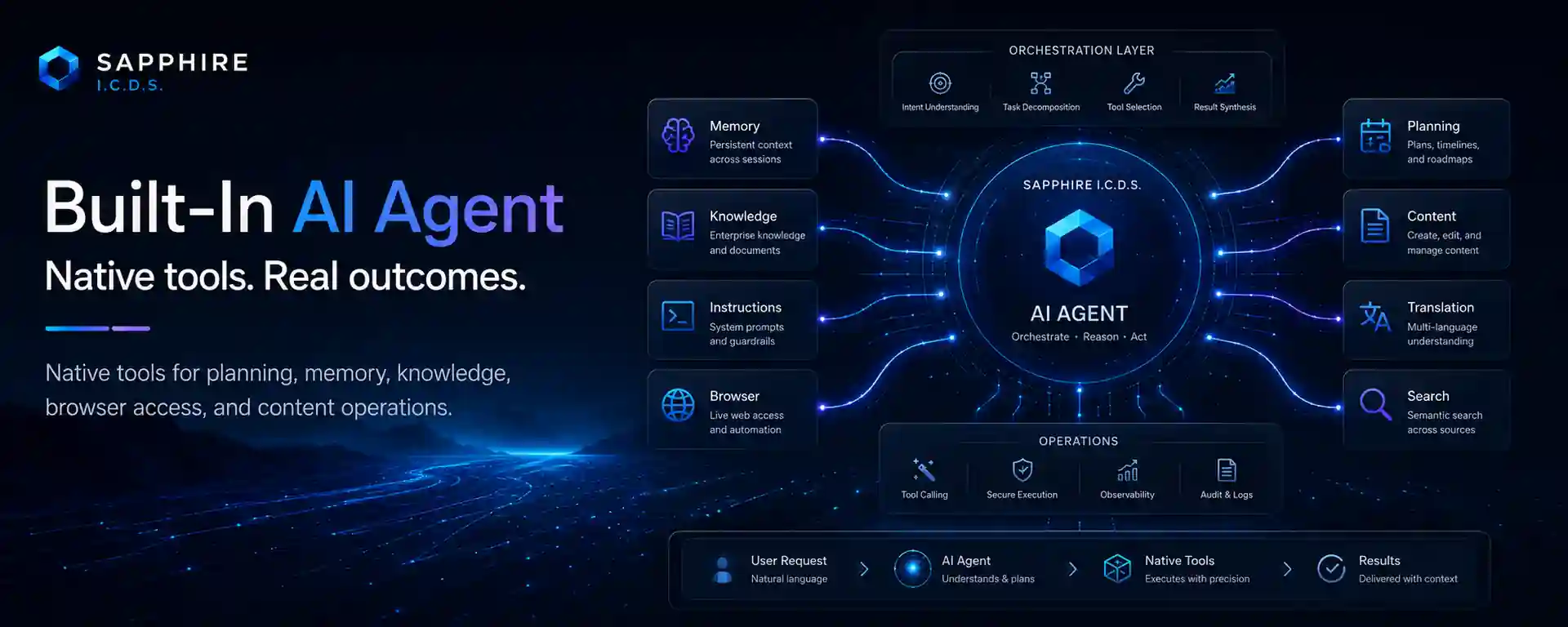
A conventional enterprise chat with a language model can explain, summarise, and suggest decisions, but it remains outside operational data. An employee has to copy information out of the system, formulate a request, and then transfer the result back manually. The built-in Sapphire I.C.D.S. AI agent addresses a different problem: it works within the platform's authenticated context and can call native tools supplied by installed modules. Its value is therefore measured not by an elegant answer, but by its ability to execute an authorised sequence of actions and leave a verifiable result.
A tool is an explicit business command
A native tool is not unrestricted access to the database or server. It is a specific operation with a name, description, and argument structure published by the responsible module. One tool may retrieve a news list, another open an article, a third update a translation, and a fourth display a Roadmap item. Read operations, changes, and potentially sensitive actions are distinguished at the level of individual commands.
This contract benefits both sides. The model receives a clear call schema and can correct arguments after a properly classified error. The business module retains its own validation, transactions, and domain rules. The agent does not duplicate the logic for content publication, localisation, galleries, or planning; it calls the operations that the platform already treats as authoritative.
The tool catalogue is not a permission list
Sapphire I.C.D.S. separates the existence of a tool from the right to use it. A module declares that an operation exists, while central policy decides whether it is available in the AI environment. A newly discovered tool should not become active automatically. Administrators can enable actions individually, assign rights to groups, and mark a small set of system helpers as always available when the user has access to AI itself.
An additional filter applies to an ordinary session. Users may remove optional tools from the current conversation, but they cannot add anything prohibited globally or unavailable to their group. The effective set is the intersection of several conditions, not the state of browser controls. Even if an interface request is manipulated, the server validates every action again before execution.
- Global policy determines whether a tool is permitted at all.
- Group rights bind AI to the organisation's existing access model.
- Always-available helpers are controlled by the server and cannot be disabled accidentally in chat.
- Session selection can only narrow the optional action set for a particular task.
What the agent can do in practice
The available set depends on installed modules and approved policy. The current environment includes tools for content and news, localisations, albums and photographs, Roadmap items, workspace configuration, plans, and selected industry operations. It also includes helpers for maintaining a task plan, searching chat history, and obtaining the current date and time. The existence of a category does not mean that all its actions are available to every user.
The working pattern matters more than the list. A manager can ask for a project status assembled from several sources, an editor can prepare and apply an approved update, and an operator can request a data set with an explanation of deviations. The agent calls tools when required, returns their results to the model, and forms the final answer. Independent safe operations may be handled together, but every action remains a separate verifiable call.
Long tasks should not lose their context
An agent workflow often lasts longer than one response. Sapphire I.C.D.S. retains sessions, tasks, messages, events, and tool results, takes account of the selected model's available context, and supports governed compaction of history. As the context approaches its working limit, the system can create a checkpoint summary that preserves the objective, completed steps, outstanding work, and accepted constraints. A user can also queue a clarification for an active task without disrupting the current operation.
This is not infinite memory and does not guarantee error-free conclusions. Model limits remain real, and a summary still requires quality control. What matters to the business is a repeatable continuation procedure rather than the accidental loss of decisions after a long conversation.
Observability without unnecessary disclosure
The platform separates the data the model needs to continue from the data displayed in the user interface. An ordinary user may see a safe activity status, while raw arguments, detailed tool results, and technical errors require a specific permission. Task state, completion, cancellation, and event history are scoped to the session owner.
This supports incident analysis and automation quality review without turning every screen into a log of internal data. A failure in one tool also does not have to terminate the entire task: the agent receives a structured rejection, can correct an admissible argument error, or can continue with other actions. A permission denial is not an invitation to try a different parameter.
How to introduce an internal agent
A rational rollout begins with read operations and narrow, easily verified changes. The team builds an action catalogue, assigns owners, defines risk, and states the criterion for a successful result. Rights are then granted to a pilot group, and real cases are validated on isolated data. Bulk changes, external messages, and other high-impact actions are added only after that foundation is proven.
The built-in AI agent consequently becomes a regulated interface to the platform's business capabilities, not a universal administrator. It can outperform a person on repeatable chains while remaining within the same access boundaries and domain rules. For the business, this means automation without a shadow system. For the technical team, it means one command catalogue, central policy, and an observable execution history.